



If you think your Windows computer is safe from prying eyes, think again. A new report reveals that Microsoft has the encryption keys to your hard drive, and it can even give them out to law enforcement, including the FBI. Here’s what you need to know and what you can do to stop it from happening to you.
The story
In a stunning breach of personal privacy and security, Microsoft admitted in January that it provided the FBI with the BitLocker recovery keys to three different Windows PCs that were linked to suspected COVID unemployment assistance fraud in Guam. With these keys, the FBI was able to access the files on those devices as part of its investigation.
The good news is that there are several ways to keep both Microsoft and the government out of your precious files.
While it’s always great to see the federal government chase down waste, crime, and fraud, the situation raises concerns over Microsoft’s ability to access the protected files on practically anyone’s Windows PC and provide information to the government without users’ knowledge or consent.
The Redmond tech giant received its first request from a government official during the Obama administration in 2013. Although the engineer who spoke with the official reportedly declined to build a back door into Windows that would give the government unbridled access to user files, Microsoft still admits to turning over BitLocker recovery keys to law enforcement as recently as 2025. According to the report, Microsoft receives approximately 20 access requests from the FBI per year.
What is BitLocker?
BitLocker is the encryption software that comes on most modern Windows PCs. It is designed to protect the files on your hard drive from unauthorized access by locking them with an Advanced Encryption Standard algorithm. The only way to break into a computer protected by BitLocker is to either use the direct route (your login password) or to bypass security measures with a recovery key. Recovery keys for your Windows devices can be linked directly to your Microsoft account, making them accessible to both you and Microsoft itself.
Is your Windows computer at risk?
Whether or not your computer is at risk of government intrusions depends on how BitLocker was set up on your Windows PC.
You are not at risk if …
- You use a Windows PC without a Microsoft account. (You haven’t logged into the system with your Outlook email address.)
- You use a Windows PC with a Microsoft account but you chose a local recovery key backup option at activation.
- You disabled BitLocker encryption when you set up your PC.
You are at risk if …
- You use a Windows PC with a Microsoft Outlook account and you chose to back up your BitLocker recovery key to your account.
- Your PC is a work machine that’s managed by your employer.
For those at risk, Microsoft promises that it only gives out encryption keys to lawful requests from the government. That said, if Microsoft can access your encryption keys, what’s stopping a hacker from getting them? The problem with storing security keys on cloud servers is that anyone can reach them with the right password, login information, or exploit.
How to stop the FBI from snooping on your PC
The good news is that there are several ways to keep both Microsoft and the government out of your precious files. You can remove your BitLocker recovery key from your Microsoft account with a few simple clicks.
RELATED: With these web browsers, everything on your computer can be stolen with one click
Photo by Matt Cardy/Getty Images
WARNING: There isn’t a way to restore your recovery key once it is deleted. Before following the steps below, make sure you write down your Key ID and Recovery Key, and keep them in a safe place, either in a physical vault or in a trusted digital password manager. Even once your key has been removed from Microsoft’s servers, it will remain active for you to use as needed. That said, here’s how to proceed.
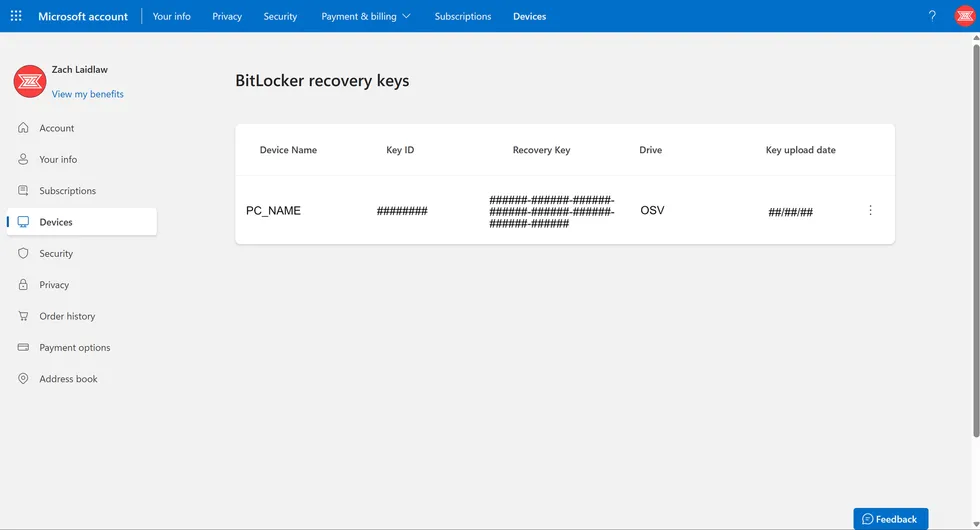
(1) On a web browser, go to the BitLocker recovery key section on your Microsoft account.
 Screenshot by Zach Laidlaw
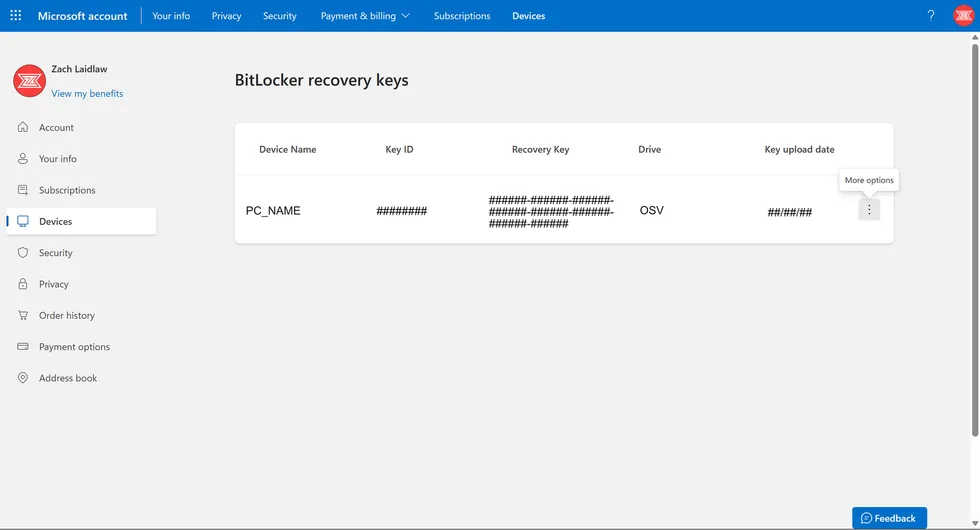
(2) Locate your device on the list. Depending on how many Windows machines you have owned, you may have to scroll to find your current PC.
 Screenshot by Zach Laidlaw
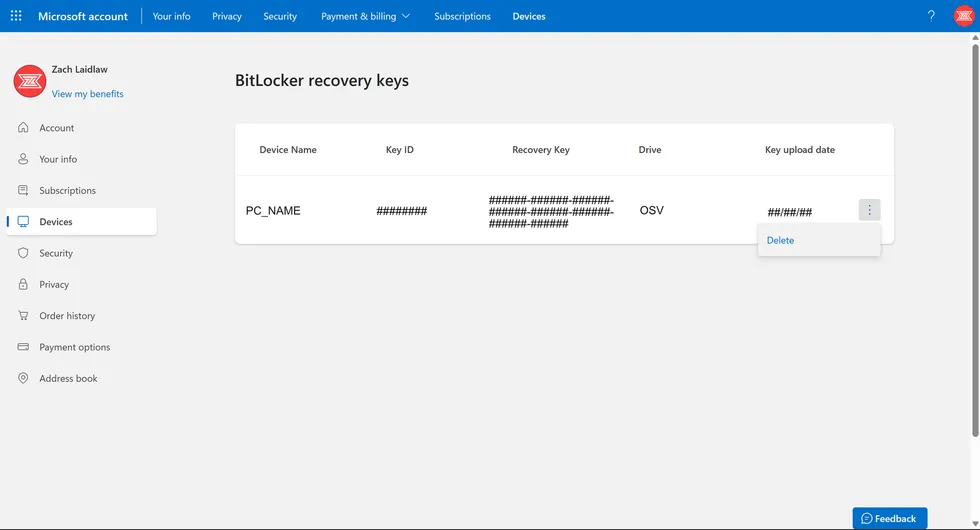
(3) Write down your Key ID and Recovery Key somewhere safe. Click the three-dotted “More Options” menu on the right.
 Screenshot by Zach Laidlaw
(4) Click delete.
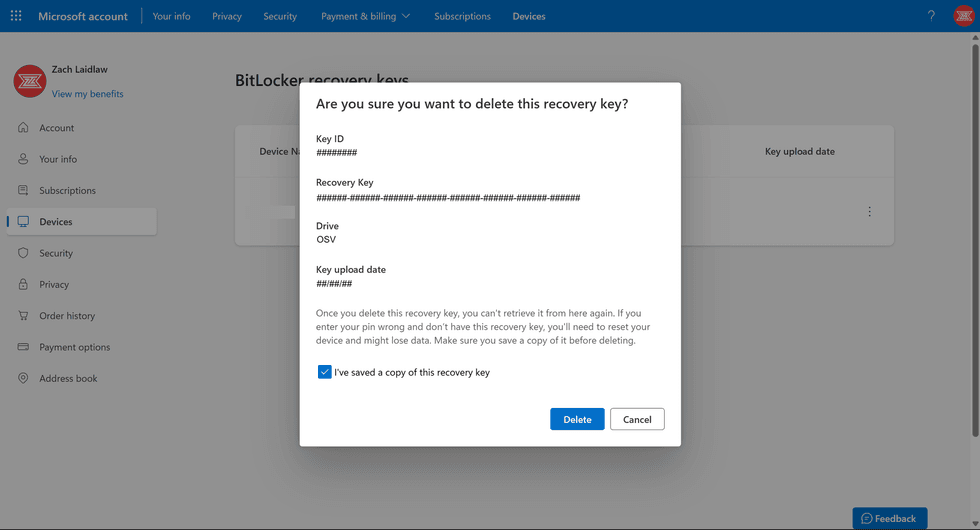 Screenshot by Zach Laidlaw
Your recovery key has now been removed from your Microsoft account. However, due to Microsoft’s content deletion policies, it still may take another 30 days before the recovery key is completely removed from Microsoft’s servers.
Don’t trust your Windows PC
While it is simple enough to prevent government snooping by removing your BitLocker security key from Microsoft’s system, anyone who’s especially concerned about user privacy and security should consider an alternative desktop operating system. Neither Apple nor Google save copies of their customers’ encryption keys, ensuring that user data on Macs and Chromebooks can’t be handed over to the government, even with an official request. Linux machines are also notoriously difficult to crack in terms of digital security. As of today, Microsoft is the only major tech company that keeps encryption keys on hand, making Windows a poor choice for privacy-conscious users.
Read the full article here


![Mick Jagger Says Fans Don’t Want Politics at Concerts After Springsteen’s Anti-Trump Rants [WATCH]](https://www.boredtrashpanda.com/wp-content/uploads/2026/07/2026.07.13-08.30-boredtrashpanda-6a54a21e430fa.jpg "Mick Jagger Says Fans Don’t Want Politics at Concerts After Springsteen’s Anti-Trump Rants [WATCH]")
![McConnell Breaks Silence on Hospital Mystery as Senate Faces Fresh Turmoil After Graham’s Death [WATCH]](https://www.lifezette.com/wp-content/uploads/2026/07/2026.07.13-08.51-lifezette-6a54a70f9f49d.jpg "McConnell Breaks Silence on Hospital Mystery as Senate Faces Fresh Turmoil After Graham’s Death [WATCH]")


![Pentagon Set To Keep National Guard Presence In Washington Through Trump’s Second Term [WATCH]](https://www.lifezette.com/wp-content/uploads/2025/08/2025.08.17-09.40-lifezette-68a1a395e08aa.jpg "Pentagon Set To Keep National Guard Presence In Washington Through Trump’s Second Term [WATCH]")
![Carville Explodes as He Rips Into ‘Left Wing Idiots’ for Wrecking Democrats [WATCH]](https://www.lifezette.com/wp-content/uploads/2024/11/2024.11.26-04.45-lifezette-6745fb38d9ec0.jpg "Carville Explodes as He Rips Into ‘Left Wing Idiots’ for Wrecking Democrats [WATCH]")