



Spam texts are on the rise, mucking up your phone with group chats filled with people you don’t know and who didn’t ask to be lumped together for some nefarious reason. While these texts might seem like a simple nuisance, they can ultimately lead to more spam, phishing attempts, or worse. Just like with spam calls, though, there’s an easy way to silence spam text alerts and block messages from your phone.
Spam texts are on the rise
If you’ve received more spam text messages lately, you’re not alone. Consumer Reports confirmed that text-based scam attempts have risen by 50% as of 2025. Part of this is due to the broad-scale availability of RCS, a fairly new texting standard that replaced the antiquated SMS on both Android and iPhone. Although RCS is generally more private and secure than SMS, the new service makes it easier for scammers to send media attachments designed to get you to click through to a spam website where they can steal your private information.
What to do if you receive a spam text
If you receive a spam text, do not respond! Don’t ask why you’re in the group chat, don’t demand the head of the person who added you, don’t talk to anyone else that asks the same things, and for the sake of your future sanity, don’t click on any shared links. Doing any of these actions simply confirms to the sender that your phone number is valid, and you will be added to other spam lists for future scam calls and text messages. It’s better for spammers to think your number is inactive than to let them know that you are a viable target. Instead, here’s what you should do the next time you receive a spam text message.
How to block spam texts on iPhone
On iPhone, open up the Settings app. Scroll down to the very bottom of the page and tap “Apps.” From there, scroll to the center of your app list and tap into “Messages.” Scroll halfway down the page again and find the section titled “Unknown Senders.”
From here, you’ll want to enable “Screen Unknown Senders.” This will automatically flag any text messages you receive from unknown numbers and move them to a separate list within your Messages app. Next, check the “Time Sensitive” toggle. This will allow alerts, two-factor verification codes, and urgent texts to still come through so you won’t miss anything important that’s non-spam related. Finally, check the “Filter Spam” option to hide spam notifications and move these unwanted messages to a separate list in the Messages app. With these features enabled, you won’t be alerted when a spam text comes in, but you’ll still get the chance to review the message and decide if it’s actually spam.
Screenshots by Zach Laidlaw
TIP: Keep in mind that these settings are available on iPhones running iOS 26. You may not see these options, or they may be slightly different, if you’re on an earlier version of iOS.
If you want to view your quarantined spam texts, open the Messages app on your iPhone. Tap the filter menu in the top right corner. Click on either “Unknown Senders” or “Spam,” depending on which you want to view. From here, you can either read the messages for fun, remove them from the spam list if they’re not actually spam, or delete them entirely. Whatever you do, though, don’t reply.
How to block spam texts on Android
For Android, we’re specifically looking at the spam blocking features built directly into the Google Messages app. If you’re using a different messages app, these features may differ or may not even be available. For what it’s worth, Google Messages is the best native SMS and RCS app on Android, thanks to its simplicity, security, and broad support. I strongly recommend switching to Google Messages if you haven’t already.
To get started, open the Google Messages app on your Android phone. Tap on your profile picture in the top right corner, followed by “Messages Settings.” Near the bottom of the page, select “Protection & Safety.” Finally, toggle “Spam Protection” into the on position. Once enabled, Android will automatically scan and filter your spam text messages into the spam section in your messages app.
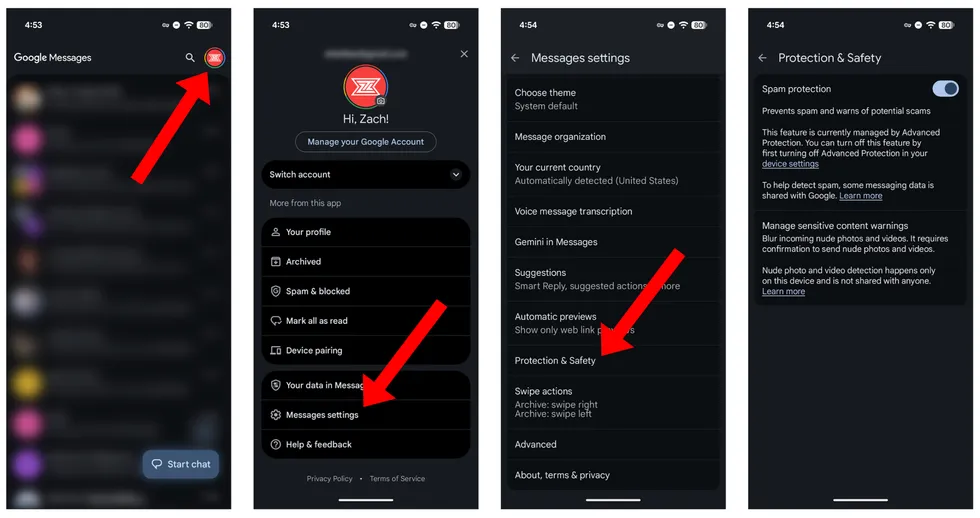 Screenshots by Zach Laidlaw
WARNING: Although most of Android’s spam detection features happen directly on the device, Google admits that “spam information is sent to Google anonymously to improve spam and abuse protection.” This information can include the phone numbers of unknown senders who aren’t in your contacts list. Google maintains that your name and phone number are not shared with Google and that your identity remains anonymous.
Reclaim your messages app
Spam text messages are annoying, but thanks to these features built directly into iOS and Android, it’s easier than ever to make them disappear. Toggle a few quick settings and reclaim the peace of a quiet messages app where only the people you want to talk to can actually reach you.
Read the full article here