




It’s impossible to miss election season. Signs show up in neighbors’ yards, the mountains of fliers pile up in the mail, and your email inbox fills up with political messages asking for donations or a vote. In the past, you could easily file these emails into the spam folder and rarely hear from the sender again, but not this year.
Google’s new verified sender program for Gmail lets politicians skip your spam filter and go straight to your inbox, whether you like it or not. Luckily, there are still ways to get rid of them.
The program ensures you can’t escape political advertisements.
Google recently unveiled its Gmail Verified Sender Program set to launch on September 8. Once it rolls out, verified senders, including politicians, can bypass any previous filters that would’ve sent them to your spam or junk folder. Instead, they’ll go straight into your inbox where they’re most likely to reach you.
Sounds like a nightmare, right?
According to Google, this system “helps eligible, verified political committees in the United States reliably deliver policy-compliant and non-abusive messages to personal Gmail accounts on an ongoing basis.” In reality, the program ensures you can’t escape political advertisements, at least not with the usual methods.
Politicians have to follow the rules
If there’s any saving grace, it’s that Google has some ground rules for any politician who wishes to use the new program. Politicians have to:
- Refrain from sending anything that resembles spam, including unsolicited or repetitive emails. Theoretically, if you didn’t sign up for a political mailer, you shouldn’t be subjected to these messages in the first place.
- Meet all of Google’s mass email guidelines, which include proper domain authentication and message formatting. All emails must also include an “unsubscribe” button for CAN-SPAM compliance.
- Follow Gmail’s anti-abuse policy, which means they can’t attempt to commit fraud, promote illicit activities, engage in harassment, or other unsavory behaviors.
Furthermore, if more than 0.3% of respondents label an incoming email as spam across any rolling 14-day period, Google may suspend the politician’s email operations for seven days or terminate his or her email program entirely.
RELATED: Google is finally letting you change the most important thing about your Gmail account. Here’s how.
Orbon Alija/Getty Images
How to keep political emails out of your inbox
Just because political emails can bypass your spam folder doesn’t mean there aren’t ways to keep them out of your inbox. In fact, Google’s rules alone show that there are still several things you can do to clear out the political clutter. Here are your options:
- Hit the unsubscribe button: By law, all commercial emails and advertisements — including political messages — are required to include a simple-to-find unsubscribe button at the bottom of the email. Click on that, confirm your decision on the next page that pops up, and you should be opted out of future email chains.
- Get creative with Gmail labels: Google gave Gmail a neat little trick that lets you target emails with specific keywords, or that arrive from certain senders, and automatically throw them in the trash. To set up one of these filters, open Gmail in your web browser on a computer, click the Settings cog in the top right corner, then select “See all settings.” From here, go to “Filters and blocked addresses,” and create a new filter. Type in the information you want to target and select “Create filter.” On the checkboxes page, mark “Delete it.” Lastly, click the “Create filter” button, and you’re all set. No more political emails.
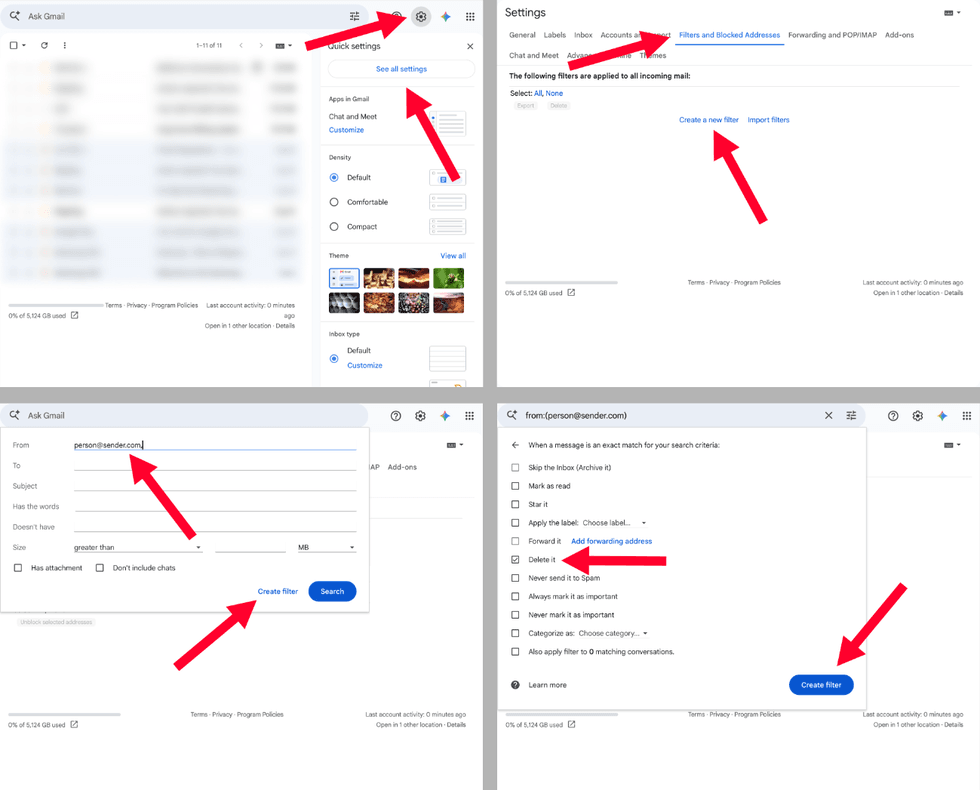 Screenshots by Zach Laidlaw/Gmail
- Hit the spam button anyway: When a political email drops into your inbox, you reserve the right to relabel it as spam. While this may not keep the next email from that campaign from hitting your inbox again, your efforts can help suspend the account or even terminate it.
- Use a different email provider: When all else fails, you can always put your Gmail aside and use a different email provider that will let you block political messages from the start.
Election season is all about reaching as many voters on as many issues as possible, but that doesn’t mean you have to listen to it. Follow these steps and reclaim a bit of your sanity, at least for your email inbox.
Like Blaze News? Bypass the censors, sign up for our newsletters, and get stories like this direct to your inbox. Sign up here!
Read the full article here




![Hayden Panettiere’s Incriminating Drug Dealer Texts Take Center Stage in DEA’s Death Investigation [WATCH]](https://www.boredtrashpanda.com/wp-content/uploads/2026/09/2026.09.15-15.22-boredtrashpanda-6aa962ce408cc-e1789497992877.jpg "Hayden Panettiere’s Incriminating Drug Dealer Texts Take Center Stage in DEA’s Death Investigation [WATCH]")