



Here’s a little fact that will make you feel old: Gmail first launched all the way back on April 1, 2004.
For the last 22 years, you have been stuck with the username you picked back at the start of the Iraq War during the Bush administration. For some, that means you were in grade school when you decided on the account name that would follow you for the rest of your life. Well, you don’t have to hold onto it any more, because Google will finally let you change your Gmail username to something more suitable.
A brief history of Gmail
Eagle-eyed readers may have spotted something odd about Gmail’s birthday in the paragraph above. It launched on the most unserious day of the year — April Fools’ Day. In fact, when Gmail burst onto the internet, users thought it was a joke, partially because it offered one full gigabyte of email storage. Although this seems rather paltry by today’s standards, it was far more than competitors offered at the time, making Gmail an instant hit in lieu of AOL, Yahoo, and Hotmail.
Google promises you won’t break anything by changing your Gmail username.
Gmail was a turning point for Google, marking its first consumer product beyond Google Search since the company’s inception. To put the timeline into perspective, Gmail showed up nearly an entire year before Google Maps debuted, two and a half years before Google acquired YouTube, four and a half years before the Chrome browser, and eight years before Google Drive.
Today, Gmail is still one of Google’s core services and a vital component of the company’s business.
How to change your Gmail username
A lot can change over two decades, and if you have been holding onto an outdated or downright embarrassing Gmail handle, now is the time to finally update it to something that doesn’t make you roll your eyes when you see it.
On iPhone
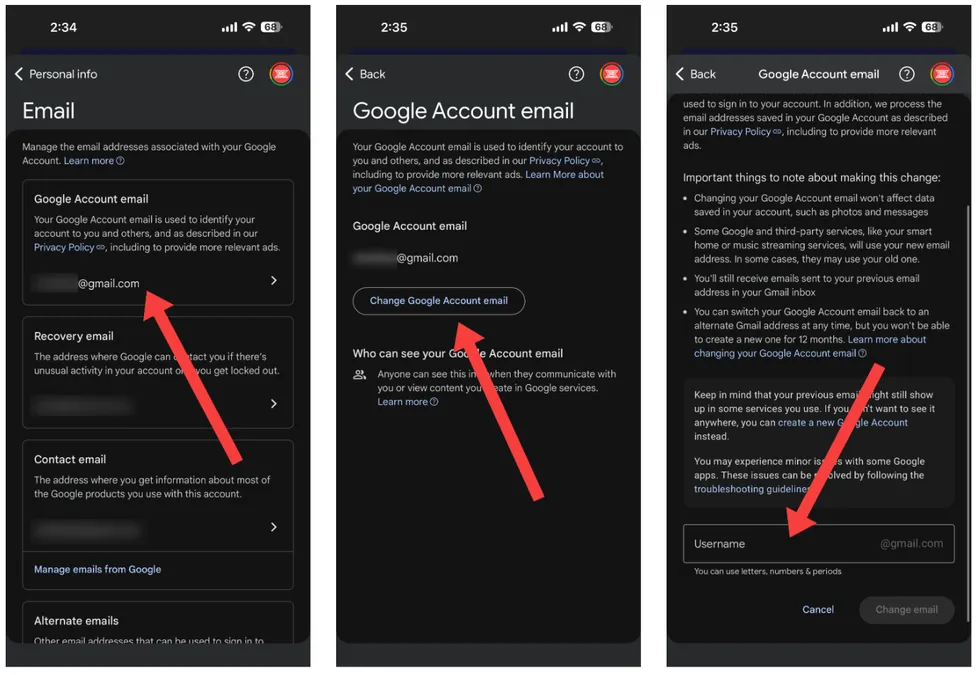
Open up any Google app you have downloaded on your phone — I recommend either the Google Search app or Google Maps. Tap on your profile picture in the top right corner, followed by “Manage your Google Account.” From here, tap “Personal info,” and then select “Email” from the list of options.
Screenshots by Zach Laidlaw/Google Account on iOS 26
In the next menu, tap on your email address beneath “Google Account email,” and choose to “Change Google Account email.” Then scroll to the bottom, type in your new handle, and tap “Change email.” Make sure the new address is correct before you submit!
 Screenshots by Zach Laidlaw/Google Account on iOS 26
On Android
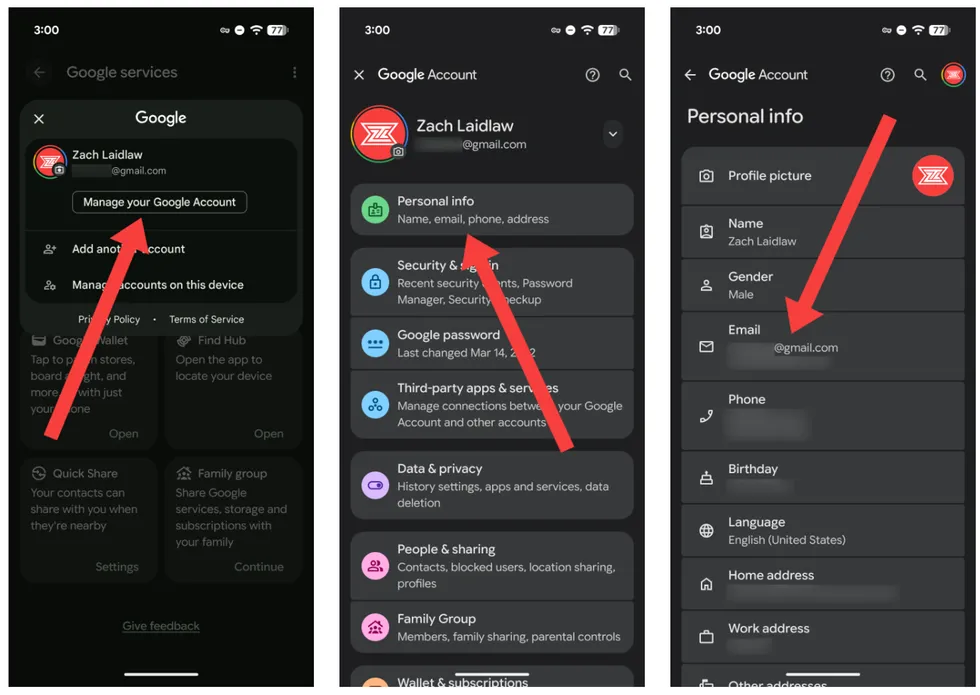
Open the Settings app, tap your name at the top, and tap your name at the top again, followed by “Manage your Google Account.” From here, choose “Personal info,” and then select “Email” from the list of options.
 Screenshots by Zach Laidlaw/Google Account on Android 16
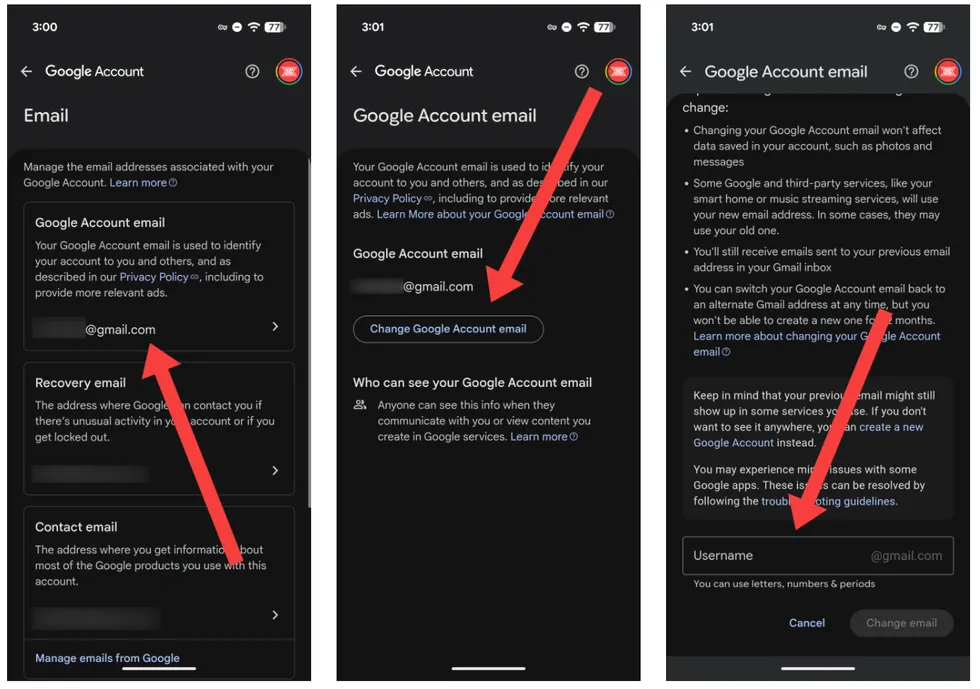
In the next menu, tap on your email address below “Google Account email,” and choose to “Change Google Account email.” Then scroll to the bottom, type in your new handle, and tap “Change email” to confirm.
 Screenshots by Zach Laidlaw/Google Account on Android 16
On PC
Go to google.com. Click on your profile picture in the top right corner, followed by “Manage your Google Account.” From here, choose “Personal info” on the left, then select “Email” from the list of options. In the next menu, click on your email address beneath “Google Account email,” and choose to “Change Google Account email.” Then scroll to the bottom of the page, type in your new handle, and tap “Change email.” That’s it!
Change at your own risk
Google promises you won’t break anything by changing your Gmail username. You will still receive new emails that are sent to your old address, and any third-party accounts created with your old address will still work as intended. The change won’t affect any of the data saved to your Google account either, including photos, Google Drive files, etc.
RELATED: Smart TVs are spying on you. One state is finally fighting back.
 Debajyoti Chakraborty/NurPhoto/Getty Images
That said, there are a couple of stipulations to keep in mind.
You’re allowed to change your Gmail username up to three times over the lifetime of your account, and you will have to wait 12 full months between each change. After this, you will no longer be able to update the username on your Gmail account; you will be stuck with the final version at the end of this period, so make sure it’s a good one!
Read the full article here