



AirDrop for iPhone and Quick Share for Android offer fun ways to quickly send photos, videos, and other files to other devices within a 30-foot radius via Bluetooth and WiFi.
Unfortunately, researchers claim that these services are compromised, and hackers can exploit them to make your life miserable.
Whether you use an iPhone or you have an Android phone, the fix is the same.
Not one, not two, but six vulnerabilities have been uncovered in both Apple’s AirDrop and Android’s Quick Share file-sharing systems. This revelation came directly from security researchers at the CISPA Helmholtz Center for Information Security in Germany.
Here’s what you’re looking at in terms of risks and threats.
The vulnerabilities
Both AirDrop and Quick Share are designed to allow users to send various files wirelessly from one device to another, even if you don’t have the contact information of the other device saved to your phone. Up until recently, AirDrop only worked between devices in Apple’s ecosystem, including iPhone, iPad, and Mac. Quick Share, on the other hand, primarily worked between Android devices, like the Samsung Galaxy and Google Pixel. Thanks to some ingenuity from the Android team, now it’s possible for some Android phones to wirelessly send files to iPhones and back, finally bridging the gap between the two file-sharing services.
Unfortunately, while AirDrop and Quick Share are meant to be a helpful — if not a neat — file-sharing feature, they’re both left wide open for hackers to intervene. According to the report, “A proximity attacker needs a laptop with Wi-Fi and a spot within range, often 10 to 30 meters. No pairing, contact exchange, or shared network is required.”
RELATED: The latest iPhone security threat has a nasty fix
Moor Studio/Getty Images
On Apple devices set to receive from “Everyone,” the early protocol phases respond before any user prompt appears. Quick Share answers nearby devices by default once it is visible.”
Once a hacker attacks a device, both AirDrop and Quick Share can misbehave but in different ways. The AirDrop vulnerability will result in a system crash that affects AirDrop, AirPlay, Handoff, Universal Clipboard, and Continuity Camera. In other words, AirDrop hackers can’t access user data through this exploit, but they can remotely disable the target iPhone, essentially turning it into a brick. Meanwhile, the Quick Share vulnerability allows hackers to bypass security protocols, leaving the system open to intercept or modify the sent file, which can be leveraged for malicious purposes.
How to protect your device from file-sharing hackers
The good news is that whether you use an iPhone or you have an Android phone, the fix is the same. You can protect your device from unwanted file-sharing hackers by restricting your AirDrop or Quick Share access to your contacts only, or disable the feature entirely. The only thing you don’t want to do is make your AirDrop or Quick Share feature available to all nearby phones.
To customize AirDrop on iPhone, open the Settings app. Then tap “General,” followed by “AirDrop.” On the next page, check either “Receiving Off” or “Contacts Only” to protect your phone.
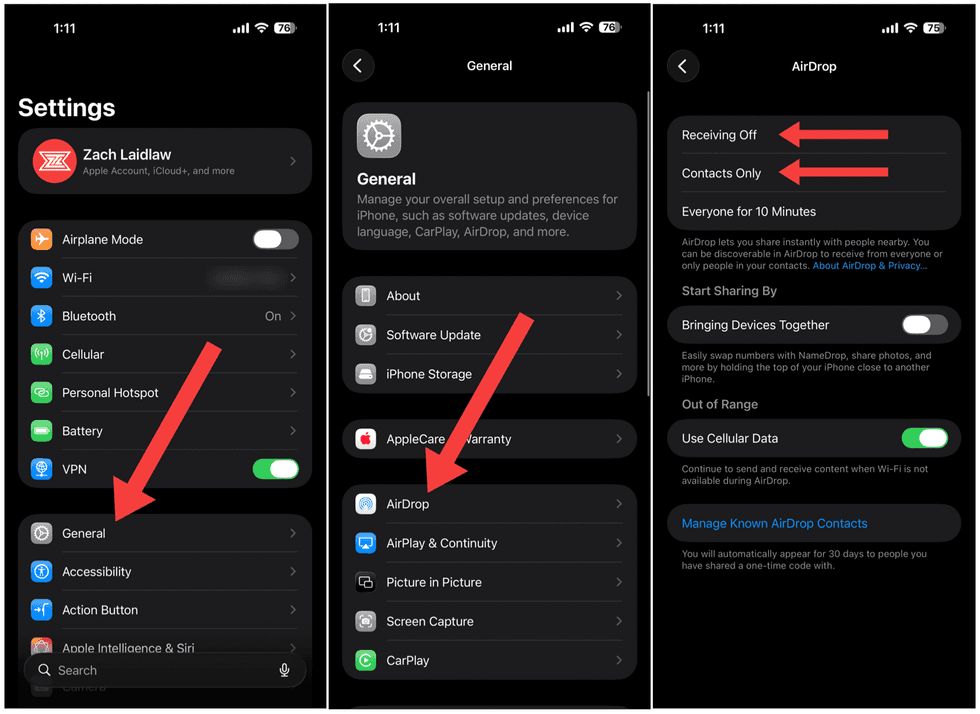 Zach Laidlaw/iPhone 17 Pro Max on iOS 26.5.2
To change the Quick Share settings on Samsung Galaxy, open the Settings app. Tap “Connected devices,” then “Quick Share,” and follow that with “Who can share with you.” From the popup menu, select either “No one,” “Your devices,” or “Contacts.”
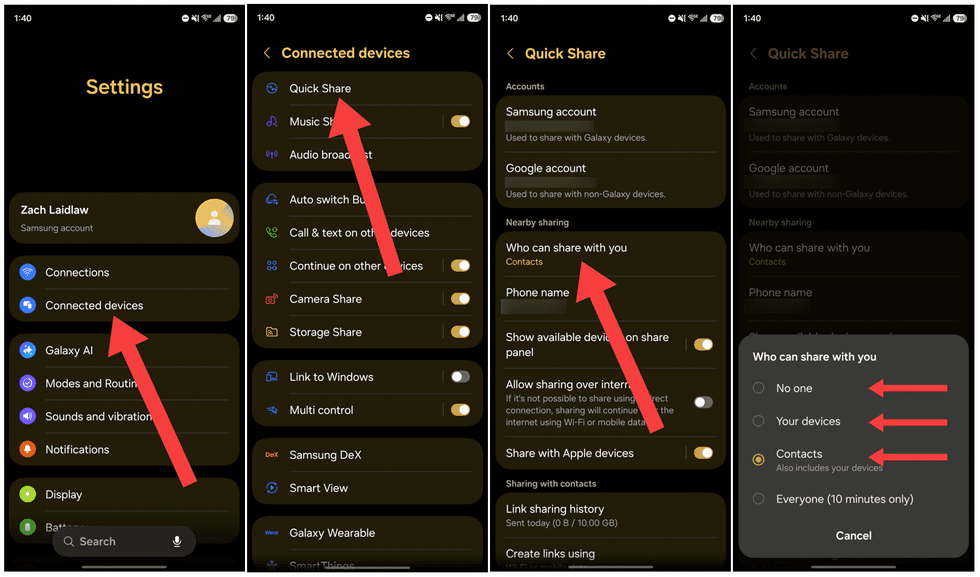 Zach Laidlaw/Samsung Galaxy Z Fold7 on One UI 8.5
Finally, to tweak your Google Pixel Quick Share capabilities, open the Settings app and hop into the “Connection devices” section, then “Connection preferences.” Tap “Quick Share” at the bottom, followed by “Who can share with you.” From there, either select “Your devices,” “Contacts,” or disable Quick Share entirely by toggling the “Visible to nearby devices” switch off.
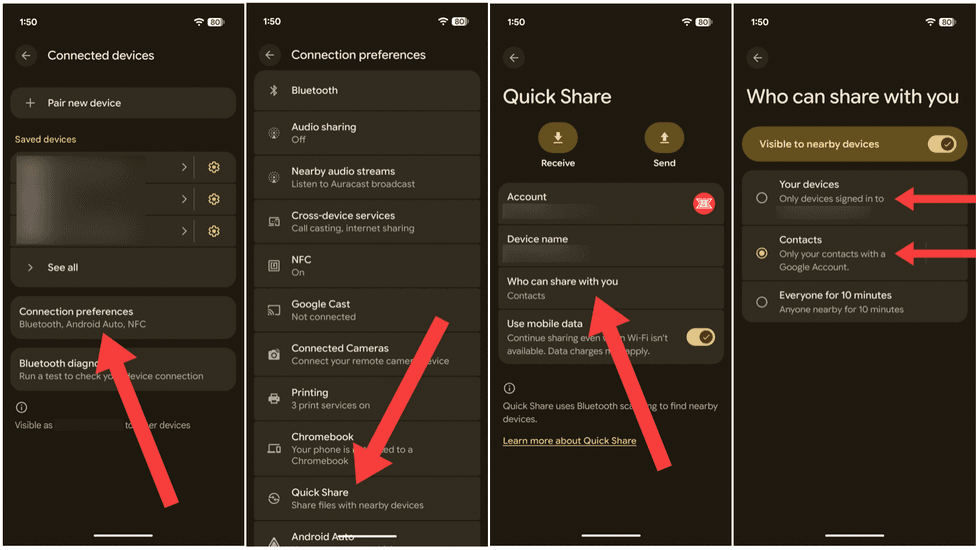 Zach Laidlaw/Google Pixel 10 Pro XL on Android 17
Now your devices are protected from hackers who may wish to exploit AirDrop and Quick Share to either disable your device or install malicious code meant to do harm. You can now roam about public spaces without risk of file-sharing attacks.
Read the full article here